Cloudflare AI Gateway for Claude and OpenAI: Cache, Limit, Fall Back
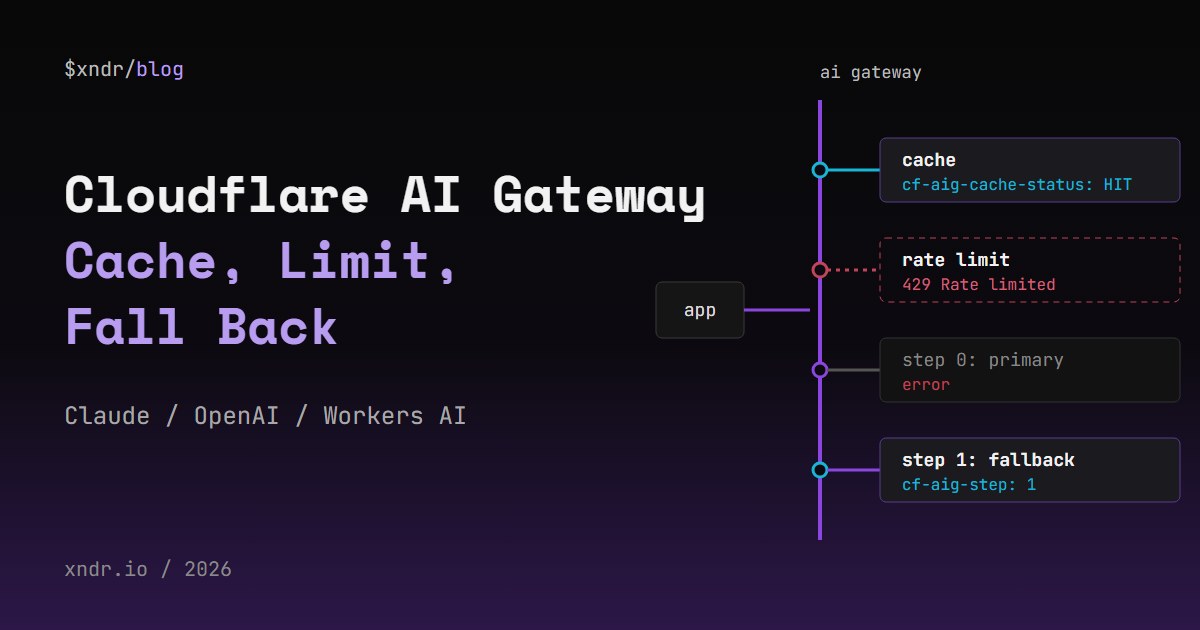
Cloudflare AI Gateway sits between your code and the model provider and gives you three things without writing a proxy: a response cache, a rate limit and a fallback to a second model. For Claude and OpenAI the change is the base URL: send requests to gateway.ai.cloudflare.com/ or /openai, then control each feature with cf-aig-* headers. This post shows what each feature did when I tested it, the headers that drive it, and a small Worker that reads cf-aig-cache-status and cf-aig-step and turns the gateway's 429 into a clear error.
What I Tested, and What I Did Not
One thing first, because it decides how far you can trust the numbers below. My test gateway had a single upstream: Workers AI, with the model @cf/meta/llama-3.1-8b-instruct called through the gateway's /workers-ai/ path. I made no call to Anthropic or OpenAI for this post.
The cache, the rate limit and the fallback header are gateway features, and those I measured on 2026-10-12. The gateway had caching on with a 60 second TTL and a rate limit of 20 requests per 60 seconds on a sliding window. Everything I say about Claude and OpenAI specifically (URL shapes, headers, which request formats a feature accepts) comes from Cloudflare's documentation, and I link the page each time. Where the docs and my test disagree or the docs are silent, I say so.
Point Claude and OpenAI at the Gateway
Create a gateway in the AI Gateway section of the Cloudflare dashboard. Its URL is your account ID and the gateway name, followed by the provider and that provider's own path. From the Anthropic and OpenAI provider pages, plus the Workers AI path I actually used:
https://gateway.ai.cloudflare.com/v1/<ACCOUNT_ID>/<GATEWAY_ID>/anthropic/v1/messages
https://gateway.ai.cloudflare.com/v1/<ACCOUNT_ID>/<GATEWAY_ID>/openai/chat/completions
https://gateway.ai.cloudflare.com/v1/<ACCOUNT_ID>/<GATEWAY_ID>/openai/responses
https://gateway.ai.cloudflare.com/v1/<ACCOUNT_ID>/<GATEWAY_ID>/workers-ai/@cf/meta/llama-3.1-8b-instruct
The provider headers stay what they were. For Claude the docs' example sends x-api-key and anthropic-version: 2023-06-01; for OpenAI, Authorization: Bearer with your OpenAI key. If you turn on authentication for the gateway, every request also needs cf-aig-authorization: Bearer <TOKEN> with a Cloudflare API token, or it fails. Requests from a Worker through the AI Gateway binding are pre-authenticated and skip that header.
So the main change in your code is the base URL. The request body stays the provider's normal body, which matters later: the cache key includes all of it.
Caching: Turn It On, Then Check cf-aig-cache-status
The caching page says it plainly: caching is disabled by default. Turn it on for the whole gateway in its settings, or per request with the cf-aig-cache-ttl header, in seconds, from 60 seconds up to one month. Every response then carries cf-aig-cache-status, either HIT or MISS.
This is the request I ran, with the account ID, gateway name and token in environment variables. It throws the body away and prints only the status line and the cache header:
curl -s -o /dev/null -D - \
  "https://gateway.ai.cloudflare.com/v1/$CF_ACCOUNT_ID/$CF_GATEWAY/workers-ai/@cf/meta/llama-3.1-8b-instruct" \
  -H "Authorization: Bearer $CF_API_TOKEN" \
  -H "Content-Type: application/json" \
  -H "cf-aig-cache-ttl: 300" \
  -d '{"prompt":"Name the HTTP status code for rate limiting.","max_tokens":16}' \
  | grep -i -E '^HTTP|^cf-aig-cache-status'
Run it twice, two seconds apart:
HTTP/1.1 200 OK
cf-aig-cache-status: MISS

HTTP/1.1 200 OK
cf-aig-cache-status: HIT
In my timed runs against the 8B model, a HIT came back in 40 to 53 ms and a MISS in 279 to 644 ms. Per the docs, a hit avoids the round trip to the provider, which on Claude or OpenAI also means one fewer paid request.
My First Run Was All MISS
The first script I wrote sent each request and its repeat back to back, with no pause. Every response said MISS. The cause was timing: the cache write is not instant. A repeat sent immediately after the first response, 0 ms later, misses; the same repeat sent one second or more later hits. In production this rarely matters, but it will fool any test that fires two requests in a row and expects the second to hit.
What Counts as the Same Request
According to the docs, the default cache key is a SHA-256 hash of the provider, the endpoint, the model, the provider's authentication header and the full request body. Exact match only. I checked the edges:
- One parameter changed:
max_tokensfrom 8 to 9 was aMISS. Any byte that differs is a new entry. cf-aig-skip-cache: truereturned aMISS, as documented.- A custom
cf-aig-cache-keymade two different bodies share one entry: the second came back as aHITin 40 ms with the first body's answer.
Two practical consequences. Anything that varies per request inside the body, such as a timestamp in a system prompt or a request ID, kills the hit rate. And because the auth header is part of the key, two API keys never share entries. A custom cache key is powerful and easy to misuse: the gateway will serve one prompt's answer to another prompt if you give them the same key, as my test showed.
What I Would Not Rely On
Streaming. The caching page does not mention it, so I tested a streamed request and its repeat twice. The first pair came back MISS then HIT, the second pair MISS then MISS. Two runs, two answers: I treat streamed responses as uncached until Cloudflare documents otherwise.
Reading the TTL back. I looked for a cf-aig-cache-ttl header on the responses; it was not there. Keep the TTL in your own config rather than trying to read it from the gateway. The docs also call the cache volatile and limit it to text and image responses, so treat it as a saving, never as storage.
For a chat with Claude, where every turn carries a longer history, exact-match caching does little. It pays off where identical requests repeat: fixed classification or extraction prompts, retries after a client timeout, evaluation runs and demo pages.
Rate Limiting: What the 429 Looks Like
The rate-limiting page offers two techniques. A fixed window counts requests in set blocks of time; a sliding window counts requests in the last N seconds, whenever you look. Over the limit, the gateway answers 429 Too Many Requests and the request is not processed. The limit applies to all requests for that gateway.
To test it, I waited 65 seconds so the 60 second window was empty, then sent 24 different requests back to back. Requests 1 to 20 got 200. Requests 21 to 24 got 429 in 107 to 172 ms, with this body:
{"success":false,"result":[],"messages":[],"error":[{"code":2003,"message":"Rate limited"}],"name":"AiGatewayError","httpCode":429,"internalCode":2003}
My first attempt did not come out that clean. I ran it straight after the cache tests and the 429s started at request 12, not 21: the requests from the cache test were still inside the 60 second window and counted against the limit. Whether cache hits count toward it, I did not prove.
The important part is the scope. This is one counter for the whole gateway, not one per user. A single client in a retry loop uses up the budget for everyone behind that gateway. Treat the gateway limit as a ceiling on total spend and keep a per-user limit in your own code.
Fallbacks: cf-aig-step Tells You Which Model Answered
The fallbacks page builds fallbacks on the Universal endpoint: you POST a JSON array of requests to the gateway URL with no provider path, primary first. If the primary returns an error, the gateway tries the next entry. The response header cf-aig-step says which one answered: 0 for the primary, 1 for the first fallback, and so on.
To force a fallback I put a model that does not exist first:
curl -s -o /dev/null -D - "https://gateway.ai.cloudflare.com/v1/$CF_ACCOUNT_ID/$CF_GATEWAY" \
  -H "Content-Type: application/json" \
  -d @- <<EOF | grep -i -E '^HTTP|^cf-aig-step'
[
  {"provider": "workers-ai", "endpoint": "@cf/meta/no-such-model",
   "headers": {"Authorization": "Bearer $CF_API_TOKEN", "Content-Type": "application/json"},
   "query": {"prompt": "Say hi", "max_tokens": 8}},
  {"provider": "workers-ai", "endpoint": "@cf/meta/llama-3.2-3b-instruct",
   "headers": {"Authorization": "Bearer $CF_API_TOKEN", "Content-Type": "application/json"},
   "query": {"prompt": "Say hi", "max_tokens": 8}}
]
EOF
HTTP/1.1 200 OK
cf-aig-step: 1
The caller sees a normal 200; only the header tells you the primary failed. With a working model first, the same request returned cf-aig-step: 0. Log that header: a fallback that fires on every request looks healthy from the outside and costs you the primary model's quality the whole time. The Universal endpoint page also documents a per-provider config with requestTimeout, maxAttempts (up to 5), retryDelay (up to 60 seconds) and backoff.
The Universal Endpoint Is Deprecated, and Claude Is the Catch
That same page carries a notice: the Universal Endpoint is deprecated, new integrations should use the OpenAI-compatible endpoint and Dynamic Routing for fallbacks, and it "will continue to work for existing integrations". Dynamic routing lets you call a route by name in place of the model, such as dynamic/support, and change the models behind it without touching your code.
The catch for Claude: the dynamic routing page says routes accept the OpenAI chat completions request shape only, and that other formats, such as Anthropic Messages, return a 400. I have not tested that myself. The Universal endpoint page shows an OpenAI entry in its examples but no Anthropic one, and I have not tested an Anthropic entry either. So if your code speaks the Claude Messages format today, you have three choices: send OpenAI-shaped requests through a dynamic route, keep using the deprecated Universal endpoint and test your Anthropic entry first, or write the fallback yourself in a Worker.
Want more like this?
New posts in your inbox, a few a month.
A Worker That Reads the Headers and Handles the 429
This Worker takes a prompt, sends it through the gateway with a two-model fallback and a 300 second cache, and returns the answer with the cache status and the step. A 429 from the gateway becomes a short JSON error instead of a raw gateway body. Store the token with npx wrangler secret put CF_API_TOKEN.
export interface Env {
  CF_ACCOUNT_ID: string;
  CF_GATEWAY: string;
  CF_API_TOKEN: string; // a secret: npx wrangler secret put CF_API_TOKEN
}

// Tried in order: the gateway moves to the next entry when one fails.
const MODELS = ['@cf/meta/llama-3.1-8b-instruct', '@cf/meta/llama-3.2-3b-instruct'];

export default {
  async fetch(request: Request, env: Env): Promise<Response> {
    if (request.method !== 'POST') return Response.json({ error: 'POST {"prompt": "..."}' }, { status: 405 });
    const { prompt } = (await request.json()) as { prompt?: string };
    if (typeof prompt !== 'string' || !prompt) return Response.json({ error: 'missing prompt' }, { status: 400 });

    const steps = MODELS.map((model) => ({
      provider: 'workers-ai',
      endpoint: model,
      headers: { Authorization: `Bearer ${env.CF_API_TOKEN}`, 'Content-Type': 'application/json' },
      query: { prompt, max_tokens: 64 },
    }));
    const res = await fetch(`https://gateway.ai.cloudflare.com/v1/${env.CF_ACCOUNT_ID}/${env.CF_GATEWAY}`, {
      method: 'POST',
      headers: { 'Content-Type': 'application/json', 'cf-aig-cache-ttl': '300' },
      body: JSON.stringify(steps),
    });

    if (res.status === 429) {
      // Gateway rate limit: the request never reached a model.
      return Response.json({ error: 'AI Gateway rate limit reached, try again shortly' }, { status: 429 });
    }
    if (!res.ok) return Response.json({ error: `AI Gateway returned ${res.status}` }, { status: 502 });

    const data = (await res.json()) as { result?: { response?: string } };
    return Response.json({
      answer: data.result?.response ?? null,
      cache: res.headers.get('cf-aig-cache-status'), // HIT or MISS
      step: res.headers.get('cf-aig-step'), // 0 = first model, 1 = fallback
    });
  },
};
I could not run it under npx wrangler dev: on the Windows machine we test on at XNDR, Application Control blocks workerd.exe, the runtime wrangler dev starts. So I imported the handler in Node 25, which runs TypeScript by stripping the types, and called fetch(request, env) directly with a real Request. Two live calls with the same prompt, two seconds apart (answers shortened):
200 {"answer":" \nHTTP status 429 is a Too Many Requests response code ...","cache":"MISS","step":"0"}
200 {"answer":" \nHTTP status 429 is a Too Many Requests response code ...","cache":"HIT","step":"0"}
That run also answered a question the docs left open for me: the cache works through the Universal endpoint, with cf-aig-cache-ttl sent on the outer request. Measured from Node on that machine, the miss took 1,487 ms and the hit 127 ms, one sample each. For the 429 branch I did not burn the gateway's limit again; I replaced fetch with a stub that returns the exact body recorded above, and the handler returned 429 with its own message. A stubbed 500 came back as 502.
Cloudflare Error 1010 From Python
My first test client was a Python script using urllib, and its requests came back with Cloudflare error 1010: access denied based on the browser's signature. The cause is urllib's default User-Agent, Python-urllib. Sending a normal User-Agent fixed it. curl and Node's fetch worked with their defaults.
Logging Stores Your Prompts by Default
Check this before you send real user data through a gateway. The logging page says logs are enabled by default for each gateway, and each log can include the prompt and the response. Two headers control it per request:
cf-aig-collect-log-payload: falsekeeps a metadata-only entry and drops the request and response bodies.cf-aig-collect-log: falseskips the log entry for that request entirely.
You can also turn logging off for the whole gateway in its settings. On cost, the pricing page says the core features, including analytics, caching and rate limiting, are free. Log storage depends on when you created your first gateway: from 2026-09-24 it follows Workers Logs pricing, and older accounts keep the legacy limits of 100,000 logs in total on Workers Free and 10,000,000 per gateway on Workers Paid.
When a Managed Gateway Is Enough
For a single app that calls one or two providers, the gateway covers caching, a global cap and a fallback with a URL change and a few headers. We at XNDR have also built our own AI proxy on Workers (the AI Gateway project on the work page), and a custom layer still earns its place when you need per-user limits, request rewriting between the Claude and OpenAI formats, or a fallback for Messages-shaped requests that dynamic routing will not take. Those are the parts the managed gateway leaves to you. If you want help with either, that is the kind of work on our services page.
FAQ
Does Cloudflare AI Gateway cache Claude responses?
The caching docs do not single out providers: caching covers text and image responses and needs an exact match of the request. I measured caching with a Workers AI model, not Claude. Remember that a Claude conversation changes with every turn, so exact-match hits come from repeated identical calls, and streamed responses were unreliable in my test.
Why is my AI Gateway cache always MISS?
Check four things. Caching is off by default, so enable it or send cf-aig-cache-ttl. A repeat sent the instant the first response arrives misses; wait a second. Any difference in the body, even max_tokens, is a new entry. And a different API key is a different cache key.
Is the AI Gateway rate limit per user?
No. The docs say it applies uniformly to all requests for the gateway, and in my test the 21st request inside 60 seconds got a 429 with error code 2003, whoever sent it. Keep per-user limits in your own code.
Is the Universal endpoint deprecated?
Yes, per Cloudflare's docs, but it continues to work for existing integrations. The recommended replacement is dynamic routing, which accepts only the OpenAI chat completions request shape; the docs say Anthropic Messages bodies get a 400. I have not tested that.
Does AI Gateway store my prompts?
By default, yes: logs are on and can include the prompt and the response. Send cf-aig-collect-log-payload: false to keep only metadata, or cf-aig-collect-log: false to skip the log entry.
Related Articles
- Building a Telegram-to-CLI Bridge for Claude Code: another Cloudflare Workers build around Claude, using KV as a message queue between Telegram webhooks and a desktop daemon.
- XNDR services: we design and build edge APIs and AI integrations on Cloudflare.
Liked this one? Get the next in your inbox.
New posts and the odd product note, a few emails a month. Easy to leave.
